Deploy one service to a single edge and to an HA pair: Elchi GSLB creates its DNS record with both addresses by itself. Add an HTTP health check with a short TTL, point your company domain at the record with a CNAME, and watch a failed address leave the DNS answer within seconds.
Elchi GSLB: DNS that follows your health.
Authoritative DNS from elchi-coredns, driven by health checks the controller runs: unhealthy edges leave the answer, regions get nearby IPs, and a record with no healthy IP falls back to its failover name.
ELCHI GSLB
Add-on · Requires Elchi CoreAdd-on to Elchi Core. Health state lives in the platform; CoreDNS nodes serve answers from versioned snapshots.
- CoreDNS Authoritative
- HTTP/HTTPS/TCP Probes
- Region-Scoped Answers
- Sharded Health Checks
What is Elchi GSLB?
Elchi GSLB is DNS-based global server load balancing for Envoy edges. A GSLB record maps a hostname to the IP addresses of the edges that serve it. The health checker inside the Elchi controller probes every IP over HTTP, HTTPS or TCP on its own schedule and moves it through four states: passing, warning, critical and recovery. elchi-coredns, a CoreDNS build with the Elchi GSLB plugin, serves the zone authoritatively from snapshots it polls from the controller, with critical and recovering IPs already removed. If every IP of a record is down, the answer points to the record’s failover name in a backup zone. IPs can carry region tags, so a regional DNS node answers with nearby edges. Records are created in the UI or through the REST API, or automatically when a client is deployed to a GSLB-enabled service.
What Elchi GSLB does
Authoritative DNS via CoreDNS
GSLB nodes pull versioned zone snapshots (with incremental change feeds) over a per-zone secret-authenticated API and answer authoritatively.
Health probes everywhere
HTTP, HTTPS, and TCP probes with custom Host headers and skip-TLS-verify options; intervals from 10 seconds to 5 minutes.
Anti-flapping state machine
A quad-state model (PASSING → WARNING → CRITICAL → RECOVERY) with configurable thresholds keeps unstable endpoints from bouncing in and out of DNS.
Failover zones
When every IP behind a record is unhealthy, DNS answers with the record's failover FQDN in a backup zone.
Region-scoped answers
Tag IPs with regions; each regional DNS node serves only the healthy IPs tagged for its region. Place a DNS node per region to keep users on nearby endpoints.
Circuit-breaker probing
Failing IPs back off gradually, up to 12× the probe interval (at most 5 minutes), instead of hammering dead hosts; state transitions trigger immediate re-probes.
Record & IP management
CRUD with bulk operations, manual health overrides, per-IP history, and IPs created automatically from service deployments.
Sharded health checking
Health checks are sharded across controllers with lease-based ownership; when a controller fails, its shards move to the remaining controllers.
IN THE PRODUCT
GSLB records and IP health in the UI
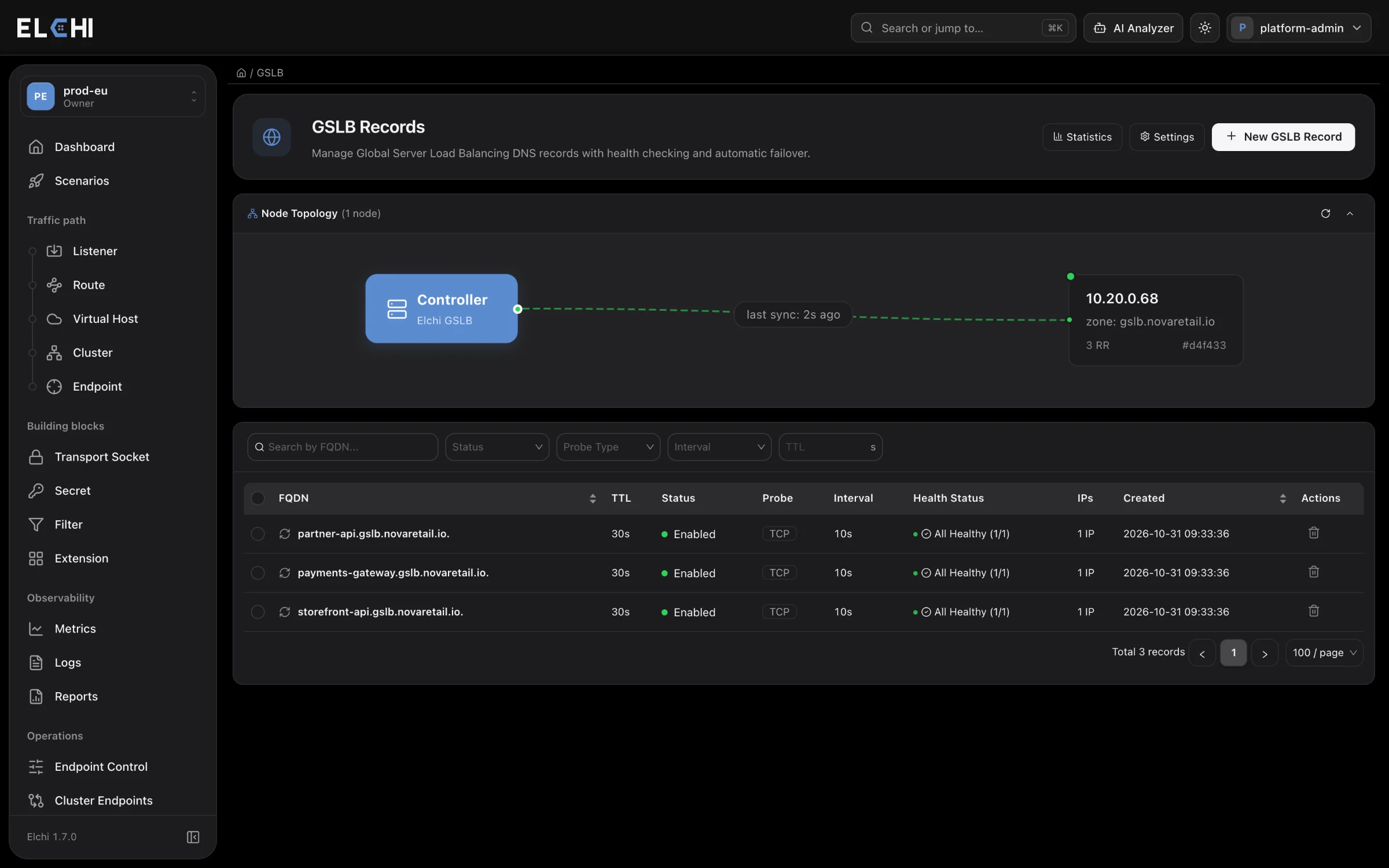
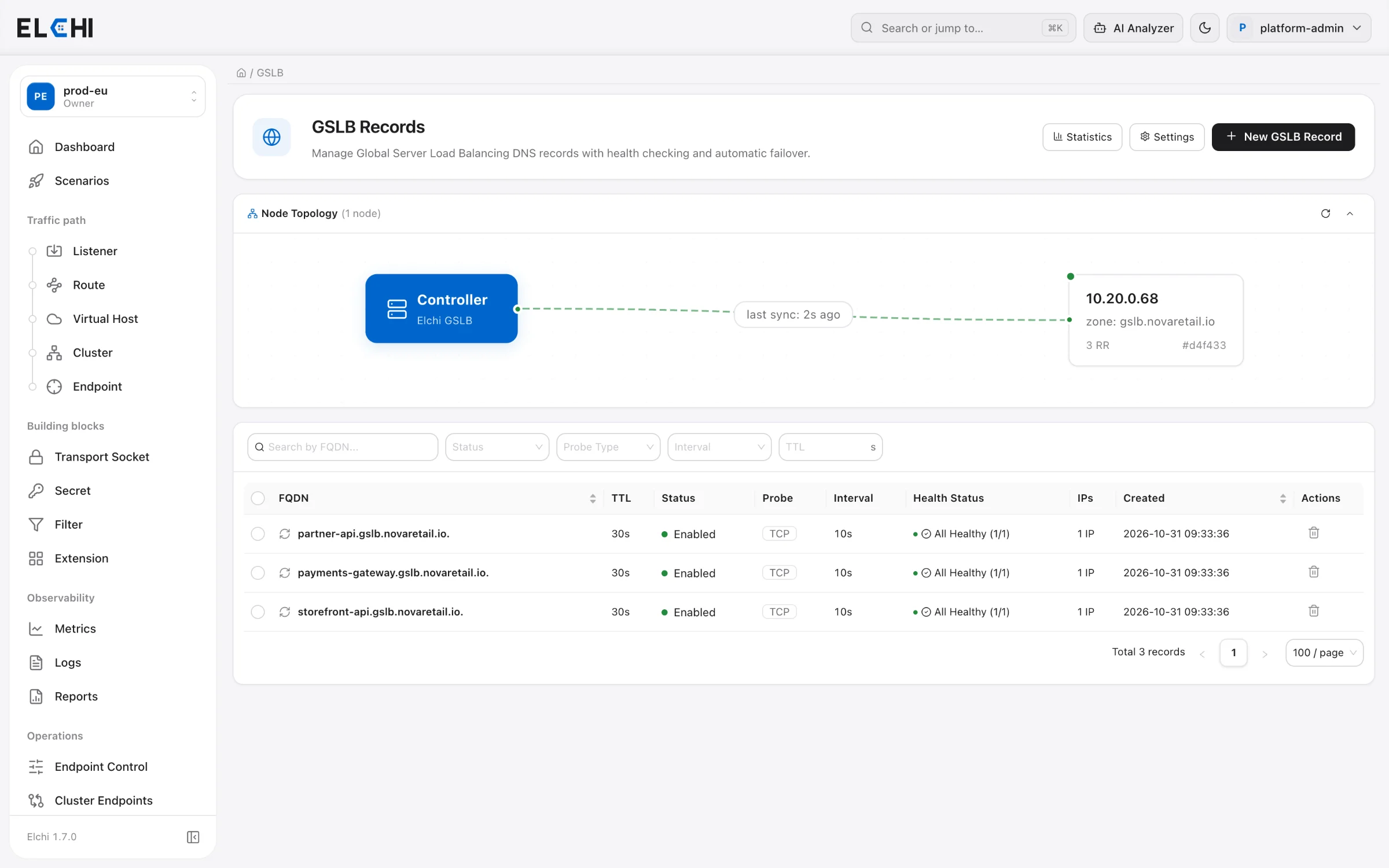
How does GSLB decide that an Envoy edge is down?
Each record has a probe: the type, port, path and Host header for HTTP, an interval from 10 to 300 seconds, a timeout from 0.1 to 3 seconds, and the accepted status codes. Consecutive failures move an IP from passing to warning at warning_threshold and to critical at critical_threshold. Only passing and warning IPs are served, so an IP leaves DNS when it reaches critical.
Warning and recovery IPs are probed at half the interval. With passing_threshold above 1, a recovering IP stays out of DNS until it has that many consecutive successes, which keeps an unstable edge from flapping.
How long does a DNS failover take?
It is the sum of three parts, each set by your configuration. First, the time for the IP to reach critical_threshold failures (warning IPs are probed at half the interval). Second, propagation to the DNS nodes: elchi-coredns polls the controller on its sync interval, one minute by default, and a notify call pushes changes to every node at once. Third, caching: resolvers and clients keep the old answer for up to the record’s TTL. Shorter intervals and TTLs fail over faster and cost more probes and more DNS queries.
What does Elchi GSLB need to run?
The health checker runs inside the Elchi controller, so there is no separate prober to deploy. elchi-coredns nodes answer DNS on port 53 (TCP and UDP) and take push notifications on port 8053. The bare-metal installer provisions them by default; on Kubernetes, set global.installGslb: true in the Helm chart.
For real traffic, delegate a zone (for example gslb.example.com) to the elchi-coredns nodes; the default zone, elchi.local, is not routable. The nodes never read the database: they fetch snapshots from the controller’s DNS API, authenticated with the zone’s shared secret.
What are the limits of GSLB?
GSLB steers at name resolution, so it is coarse-grained and bounded by resolver caching; a client that holds an answer longer than the TTL keeps using it. It does not replace in-path load balancing: Envoy still balances connections behind each resolved IP. It answers only for the zone delegated to the elchi-coredns nodes. A manual health override drains an edge only until the next probe result moves it again.
From probe to DNS answer
Define
Create records and attach IPs — manually or from services.
Probe
Controllers health-check every IP on its own schedule.
Serve
CoreDNS answers with only healthy, region-matched IPs.
Fail over
A record with no healthy IP falls back to its failover name.
Questions about Elchi GSLB
Do the DNS nodes probe the backends?
No. Probing happens in the controller. elchi-coredns only serves the snapshot it receives, with unhealthy IPs already removed.
Does it work with services Elchi deploys?
Yes. When a client is deployed to a GSLB-enabled service, Elchi creates the record and its IPs, and deploy and undeploy keep them current. You can add manual backup IPs to the same record.
Can I take an edge out of DNS for maintenance?
Yes. Set the IP’s health state to critical to remove it from answers, and back to passing to return it. Probing continues, so a real result can move it again.
Talk to us about a demo.
Tell us how many Envoy hosts you run, which Envoy versions, and which add-ons you are evaluating. We reply with a demo or a proof-of-concept plan for your setup. To try it yourself first, the quickstart installs the free tier.