Clients
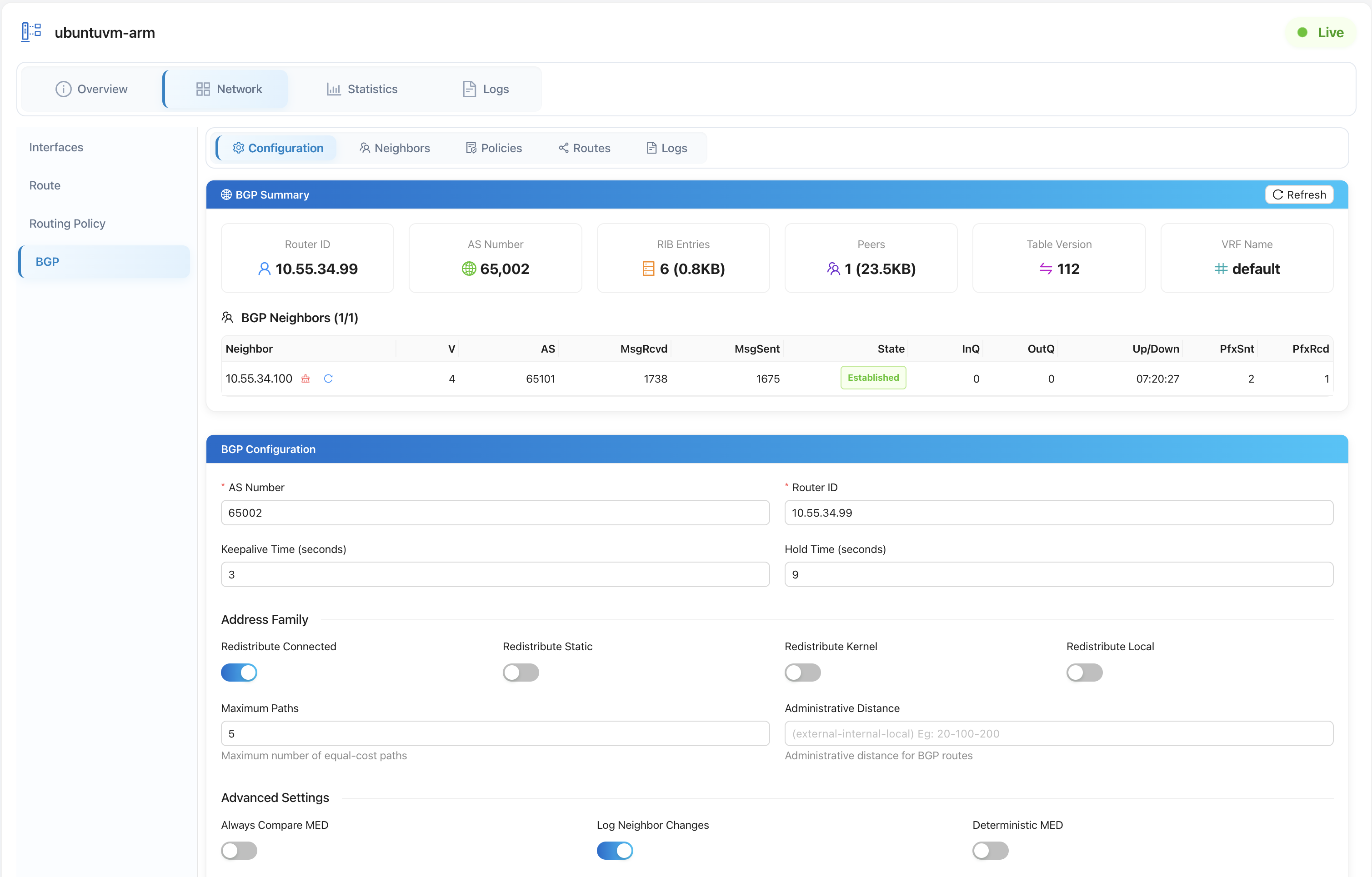
A client is an edge node running the elchi-client agent next to Envoy. The Clients console is the fleet's remote-control surface: it lists every connected node and is where you send it commands, read its host metrics and logs, and — on cloud hosts — look up network interfaces and available IPs.
The clients list
Open Clients (/clients) for the list of every registered node in the current project:
GET /api/op/clients?project=<project>&with_service_ips=true
| Column | Meaning |
|---|---|
| Name | The client (node) name. |
| Service IPs | Count of downstream service IPs the node serves; expand a row to see them. |
| Version | The elchi-client agent version. |
| Status | Live (connected) or Offline. |
| CPU | Live load average per core, for connected nodes. |
| Memory | Live memory usage, for connected nodes. |
| Last Seen | When the node last reported in. |
The CPU and Memory columns are populated by a bulk statistics command (CLIENT_STATS) sent to all connected clients when the list loads — this is command dispatch (below) used for live telemetry. Use Search to filter by name, client id, hostname, OS, arch, version, or service IP.
The Install Client button opens the installation drawer — that is the installation flow, not an operations action. Row actions are Edit (open the detail page) and Delete (DELETE /api/op/clients/:client_id — permanently removes the node from the system).
Client detail
Clicking a row opens /clients/:client_id:
GET /api/op/clients/:client_id?project=<project>
The header shows a live Live/Offline badge. The tabs are:
- Overview — identity and connection facts: client id, hostname, OS, architecture, kernel, agent version, last-seen, connect/disconnect time and reason, whether BGP is enabled, cloud/provider (for cloud hosts), and any metadata. It also lists the services running on the node.
- Network — interface and routing state (BGP-aware).
- Statistics — host resource metrics.
- Logs — agent and service logs pulled from the node.
- Apps — the versioned components installed on the node.
- Settings — per-client agent settings.
- Shield — the node's elchi-shield status and on-disk policy files.
Sending remote commands
Remote commands are dispatched by posting to the clients collection:
POST /api/op/clients
{
  "type": "CLIENT_STATS",
  "clients": [{ "client_id": "edge-01" }],
  "command": { "count": 100 }
}
The controller authorizes the command against your role and its type, selects a processor for that type (which validates the body and builds the protobuf message), then fans the command out to the target clients over the command stream — sending directly to clients on this controller and, for clients elsewhere, forwarding through the Registry to the controller that owns them. Responses come back per client, with partial success (one failed client does not abort the rest).
Command types
Each command type maps to a registered processor on the controller. The verifiable set:
type | Purpose |
|---|---|
DEPLOY | Deploy an Envoy service to the client. |
UNDEPLOY | Remove a deployed Envoy service from the client. |
SERVICE | Control the service unit on the host (start / stop / restart / status). |
UPDATE_BOOTSTRAP | Push an updated Envoy bootstrap to the client. |
PROXY | Proxy/admin operations against the running Envoy (read vs. write distinguished by path). |
ENVOY_VERSION | Manage the Envoy binary version on the host. |
UPGRADE_LISTENER | Perform a listener upgrade on the deployment. |
NETWORK | Host networking — netplan apply/get/rollback, routes, policies, tables (via sub-types). |
FRR | FRR/BGP routing management. |
CLIENT_LOGS | Fetch host/agent logs from the node. |
FRR_LOGS | Fetch FRR routing logs from the node. |
CLIENT_STATS | Collect live host statistics (CPU, memory, …). |
FILEBEAT | Manage Filebeat config/status on the node. |
RSYSLOG | Manage rsyslog config/status on the node. |
SHIELD | Get/update the client's elchi-shield config and read its status. |
WAF_VERSION | Manage the WAF/CRS version on the node. |
Many commands carry a sub-type to select the exact operation — for example the network command uses sub-types such as netplan apply/get/rollback and route/policy/table management, and the service command uses start/stop/restart/status. BGP operations are a large family of FRR sub-types.
When the target client is connected to a different controller, the command is forwarded there transparently via the Registry. If routing is failing for reachable-but-remote clients, check Registry & HA.
OpenStack interface and IP lookups
For clients running on OpenStack, the console can query the cloud's networking directly (used when assigning fixed IPs or allowed-address-pairs to an Envoy). These lookups go against the OpenStack Neutron API using the project's stored cloud credentials — the client must have provider = openstack.
List a server's interfaces
GET /api/op/clients/:client_id/openstack/interfaces?os_uuid=<server-uuid>&osp_project=<openstack-project-uuid>&project=<db-project>
Returns each port on the server, enriched with its network and subnet details (name, status, MAC, fixed IPs, allowed address pairs, CIDR, gateway, and so on). All three query parameters are required: os_uuid (the OpenStack server), osp_project (the OpenStack project UUID), and project (the Elchi project whose cloud config supplies the credentials).
Available IPs in a subnet
GET /api/op/clients/:client_id/openstack/subnets/:subnet_id/available_ips?osp_project=<openstack-project-uuid>&project=<db-project>
Returns the free and used IPs for a subnet — the subnet/network names, CIDR, gateway, the list of available IPs, the list of used IPs, and totals. Availability is computed from the subnet's allocation pools minus the network's in-use addresses and the gateway.
These endpoints resolve the OpenStack credentials from the project's cloud settings. Configuring those credentials is covered in Cloud & OpenStack.
Related
- Client Overview and Installation — getting the agent onto a host.
- Services — the Envoy deployments you push to these clients.
- Cloud & OpenStack — the cloud credentials behind interface/IP lookups.
- Registry & HA — cross-controller command routing.
- Shield deployment — the shield config the
SHIELDcommand manages.