Route Map
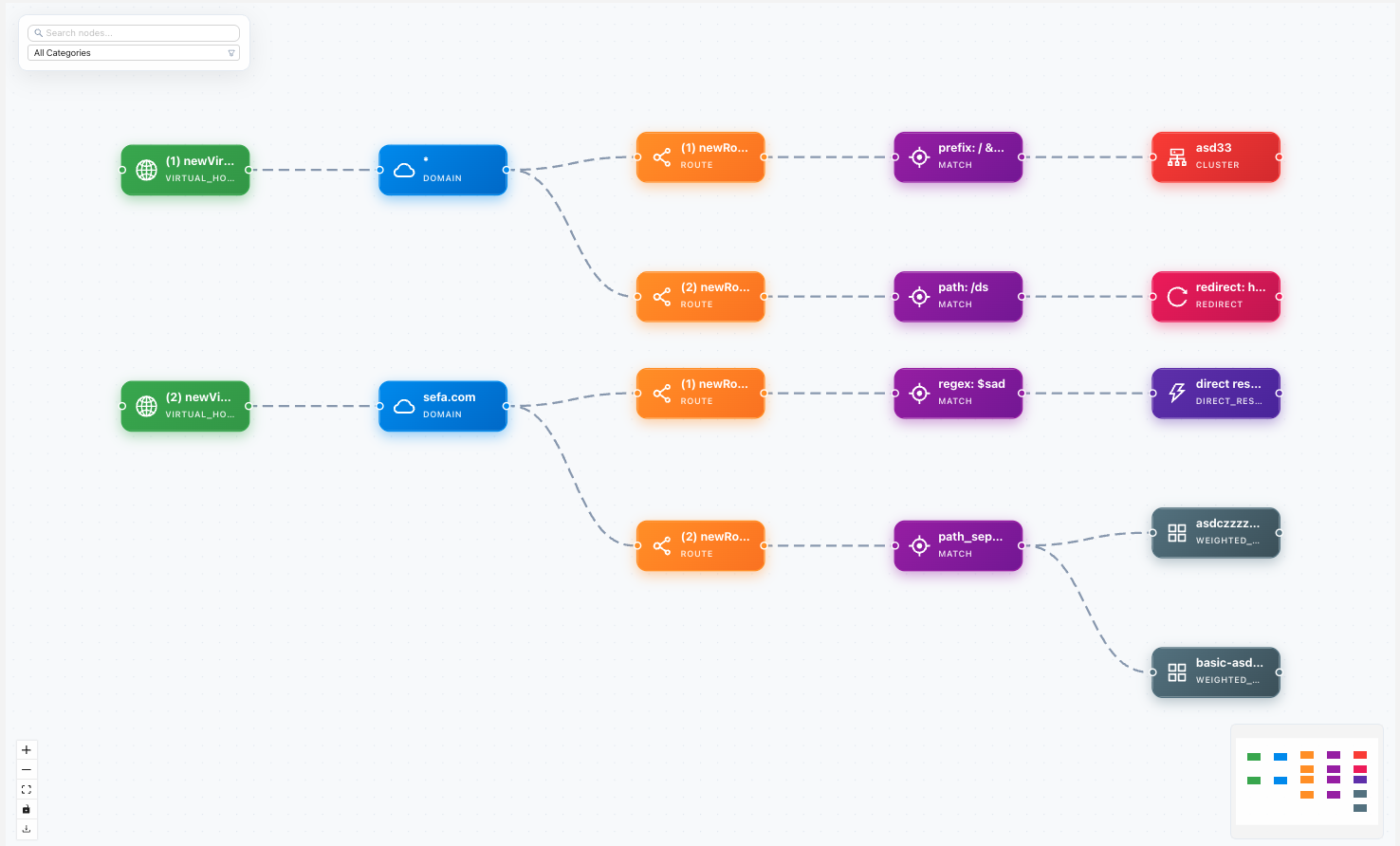
The Route Map answers a single, practical question: given this listener (or route configuration), where does a request actually go? It renders the routing half of an Envoy config as a graph — starting from an HTTP Connection Manager, walking into its route configuration, out to each virtual host, down through the ordered routes and their match conditions, and finally to the upstream cluster (or a direct response / redirect) that answers the request.
Where the Dependency Graph shows which
resources reference which, the Route Map shows how traffic is matched and
forwarded. It reads the same resource model:
every object is addressed by name, gtype (its Envoy proto type),
collection, project, and version.
What it visualizes
The controller analyzes the selected resource and returns a directed graph of nodes and edges. Reading it top-to-bottom follows the path a request takes:
- Filter (
http_connection_manager) — the entry point: an HTTP Connection Manager filter with its routing configuration. - Route configuration (
route_config) — the container that holds the virtual hosts, whether inlined, served over RDS, or delivered via VHDS (the node records itssource:rds,vhds, orinline). - Virtual host (
virtual_host) — matched by itsdomains(host/authority matching). A request is assigned to exactly one virtual host. - Route (
route) — an ordered match rule inside a virtual host: path prefix / exact / regex, headers, query parameters, and method. Envoy evaluates routes in order, first match wins — the map preserves that order. - Terminal — where the route sends the request:
- Cluster (
cluster) — a single upstream. - Weighted cluster (
weighted_cluster) — traffic split across several upstreams by weight. - Direct response (
direct_response) — a fixed status/body, no upstream. - Redirect (
redirect) — an HTTP redirect.
- Cluster (
Edges are typed to describe the relationship between two nodes — for example
has_virtual_host, has_route, matches, routes_to, redirects_to, and
responds — and carry the match conditions and weights as properties, so you can
see why a given hop is taken, not just that it exists.
Follow a request by starting at the filter node and descending: pick the virtual
host whose domain matches the request Host/:authority, then scan its routes
top-down until the first matches edge whose conditions your request
satisfies, then follow routes_to to the cluster. If nothing matches, the request
falls through — a common cause of unexpected 404s.
Supported resource types
Route mapping is defined for the three resource types that carry routing intent.
The UI discovers this set from GET /api/v3/routemap/supported-types, and the
analysis endpoint rejects any other gtype:
Resource (gtype) | Collection | Category | What it maps |
|---|---|---|---|
| HTTP Connection Manager | filters | http_connection_manager | The full path from the filter through its route config to upstreams |
| Route Configuration | routes | route_configuration | Virtual hosts and their routes within a route config |
| Virtual Host | virtual_hosts | virtual_host | Domain matching and the routes of a single virtual host |
Requesting a Route Map for anything else (a cluster, a TLS secret, an arbitrary filter) returns a "route mapping not supported" error listing these three types.
Opening a Route Map
The Route Map is reached from a supported resource and rendered as a full-page graph. The view needs four coordinates to locate the exact resource:
name— the resource name (path parameter).collection— one offilters,routes,virtual_hosts.gtype— the Envoy proto type of the resource.version— the Envoy release the resource targets (see Versions & Upgrades).
If any of these are missing the page shows a "Missing required parameters" prompt rather than a partial graph — all four are required to resolve a resource unambiguously across projects and Envoy versions.
Route Map vs. Dependency Graph
Both are inspection tools that read the same config store, but they answer different questions:
| Route Map | Dependency Graph | |
|---|---|---|
| Question | "Where does a request go?" | "What references this resource?" |
| Direction | Follows request flow: filter → vhost → route → cluster | Walks references both ways from any resource |
| Scope | Routing resources only (HCM, route config, virtual host) | Any resource type |
| Edges mean | Match / forward / redirect / respond | "depends on" / "is referenced by" |
Use the Route Map when you are debugging routing — a request landing on the wrong upstream, a match rule shadowing a later one, an unexpected redirect. Use the Dependency Graph when you are debugging structure — which listeners would break if you delete a cluster, or what a secret is attached to. For the exact xDS payload a live Envoy is serving, use the Snapshot Dump.
Related reading
- Resource model — how
name/gtype/collection/versionaddress every resource. - Routes — authoring route configurations and virtual hosts.
- Listeners — where the HTTP Connection Manager filter lives.